
Store apps
12 free tools included in your plan that raise sales and cut returns: announcement bar, order via WhatsApp, trust badges, bundles, checkout upsell, ad landing pages and more.
Open this page in your dashboardEvery app on the Apps page is included in your plan at no extra cost. Turn on what you need with the switch, then click Settings to set it up.
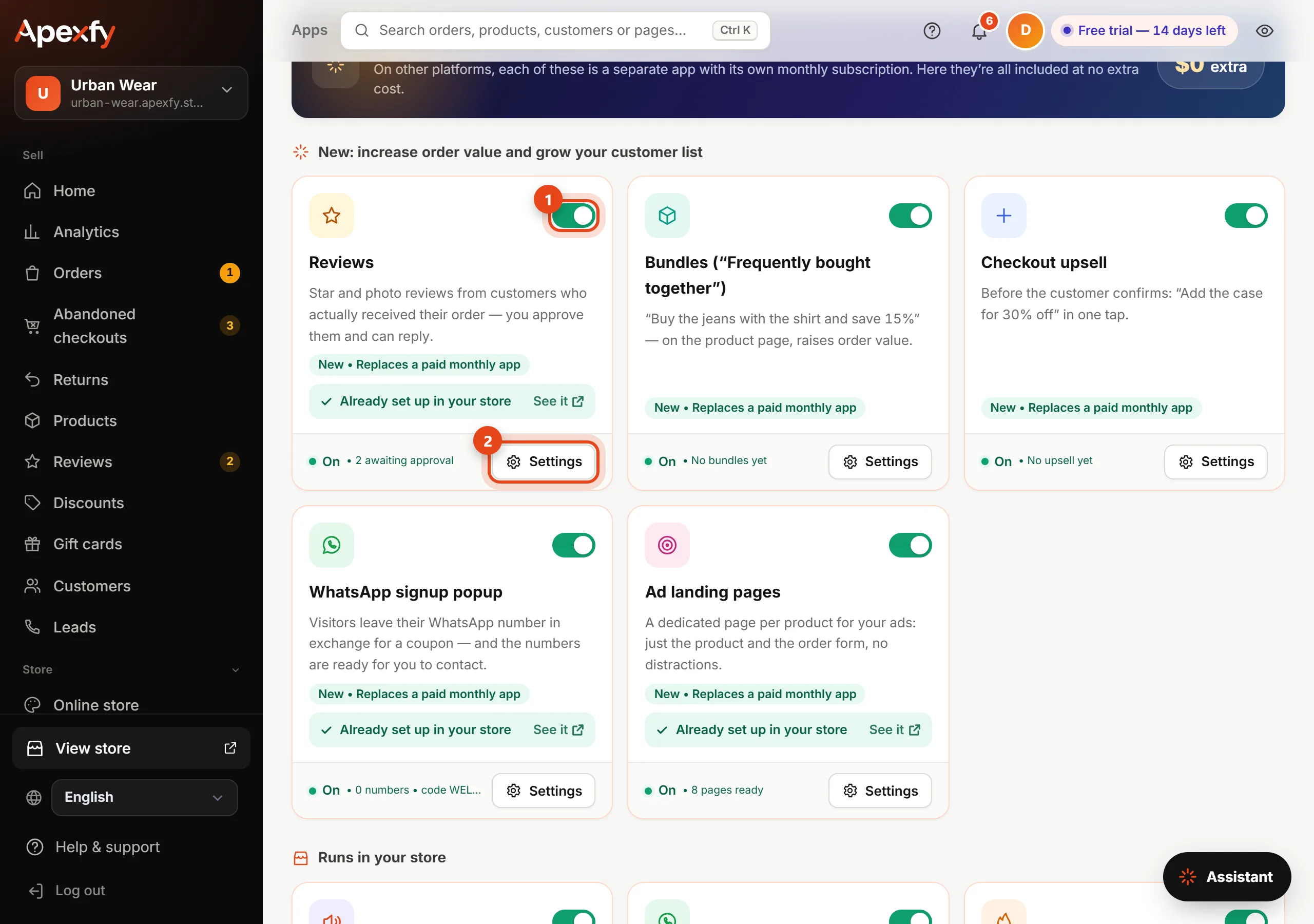
Turning apps on and setting them up
- Open Apps from the menu.
- Click the switch on an app's card to turn it on or off. The change shows in your store right away.
- Click Settings to edit its text and options, then Save.
- Some cards have See it, which opens your store where the app appears.
What each app does
| App | What it does | What you set |
|---|---|---|
| Announcement bar | A bar at the top of your store that rotates your messages | Up to 5 messages, like "Free shipping over $50" |
| Order via WhatsApp | A button under "Order now" that opens WhatsApp with the product, size, price and link | Uses your store's WhatsApp number from Settings |
| Real low-stock alerts | "Only 3 left" from your real stock, no fake countdowns | The stock level it shows at (1 to 50 units) |
| Trust badges | Badges under the order button and at checkout | Pick ready-made badges or write up to 3 of your own |
| Size chart | A "Size guide" button on the product page | Charts are added on each product page (Product details) |
| Abandoned checkouts | People who entered their number but didn't finish, with automatic reminder emails | Recover abandoned checkouts |
| Product feeds | A catalog for Google, Facebook and TikTok that updates itself | Sales channels |
| Reviews | Star and photo reviews from customers who actually received their order | Auto-approve 4 and 5-star reviews (Reviews) |
| Bundles ("Frequently bought together") | "Buy both and save 15%" on the product page | Created in Discounts: 2 to 6 products and a discount |
| Checkout upsell | "Add this for 30% off" before the customer confirms | Created in Discounts: one product and a discount |
| WhatsApp signup popup | A popup that asks for the visitor's WhatsApp number in exchange for a coupon | Title, text, coupon and delay (3 to 60 seconds) |
| Ad landing pages | A page per product at /l/ with just the product and the order form | Nothing to set up. Copy the link from the product page into your ad |
Settings examples


The WhatsApp popup shows once per visitor, and the numbers are collected under Leads so you can message or export them. (Customers)
A good start is three apps: Trust badges, Real low-stock alerts and Size chart. They reassure shoppers and cut size-related returns.