
Password page (coming soon)
Lock your store with a password while you set it up. Visitors see an “Opening soon” page, and only your team and people you share the password with can get in.
While you add products and work on the design, you may not want anyone to see the store yet. Lock it with a password: visitors see an "Opening soon" page with your message, and anyone with the password can browse and order as usual.
Lock the store
- Open Settings and find the Password page (coming soon) card.
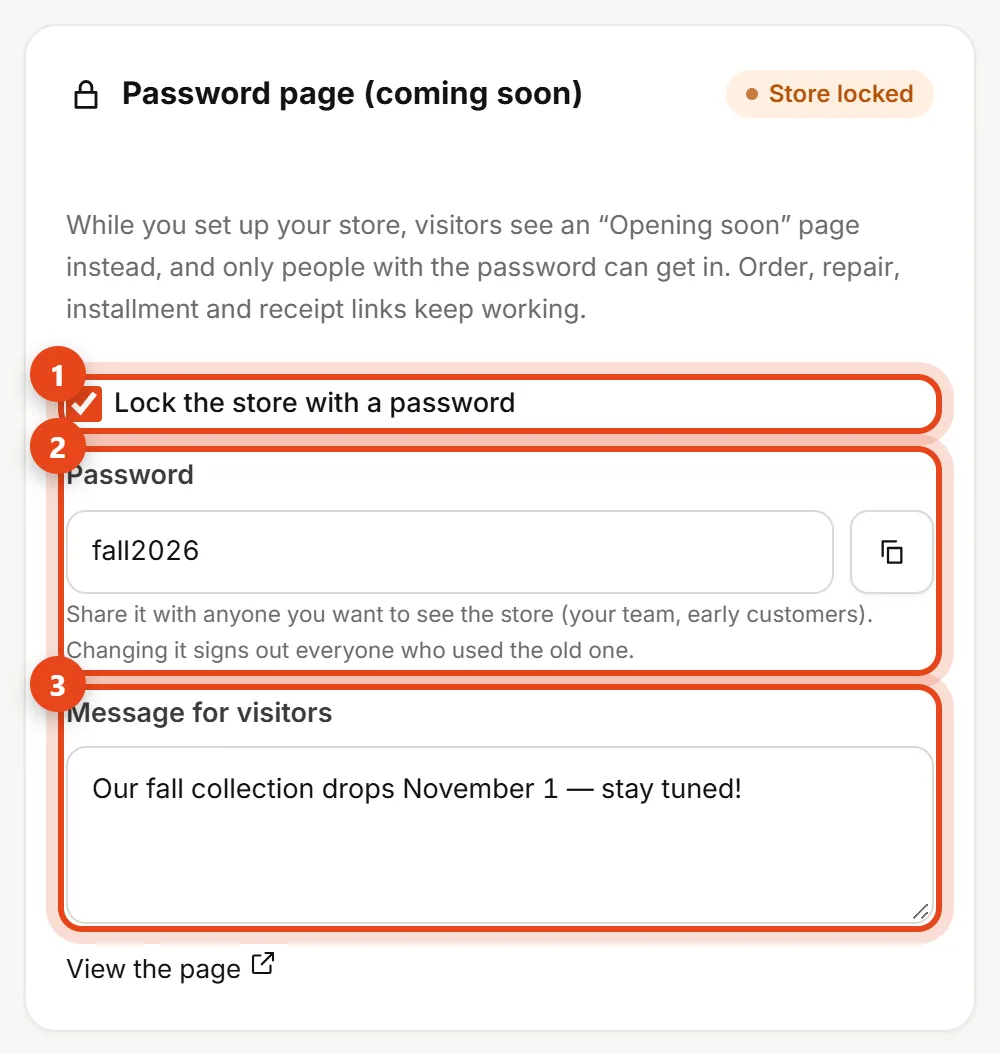
Password page card in Settings - Turn on Lock the store with a password (1). We fill in a password for you, and you can change it.
- Password (2): share it with your team or early customers. The copy button next to it copies it for you.
- Message for visitors (3): for example, your launch date. If you leave it empty, we show "Opening soon".
- Click Save.
What visitors see

- Your message in the middle of the page, with your store name, logo and colors.
- If the newsletter is on in Newsletter and email campaigns, there's a field to leave an email so you can tell them when you open.
- Under Have the password? they type the password and tap Enter. They stay signed in for 30 days on that device.
Store owner? Open your store and type the password once. Design previews from Design keep working while the store is locked.
What keeps working
Order and tracking links, plus POS repair, installment and receipt links, keep opening for your customers. Store pages don't show up in Google while the store is locked.
Changing the password or locking the store again signs out everyone who got in before, so they'll need the new password.
Open the store to everyone
When your store is ready, turn off Lock the store with a password and click Save. The store opens right away.
See also Store settings.