
Customer reviews
Real reviews from customers who received their order — approve them, reply (or let AI draft the reply), and import your old reviews.
Open this page in your dashboardWhere reviews come from
Once an order is delivered, the customer can review the product from the order tracking page, with stars, text and up to 4 photos. A Verified buyer badge shows next to their name because the review is tied to a real order.
Send a thank-you message from the order page after delivery and remind them to leave a review.
Reviewing reviews
Open Reviews.
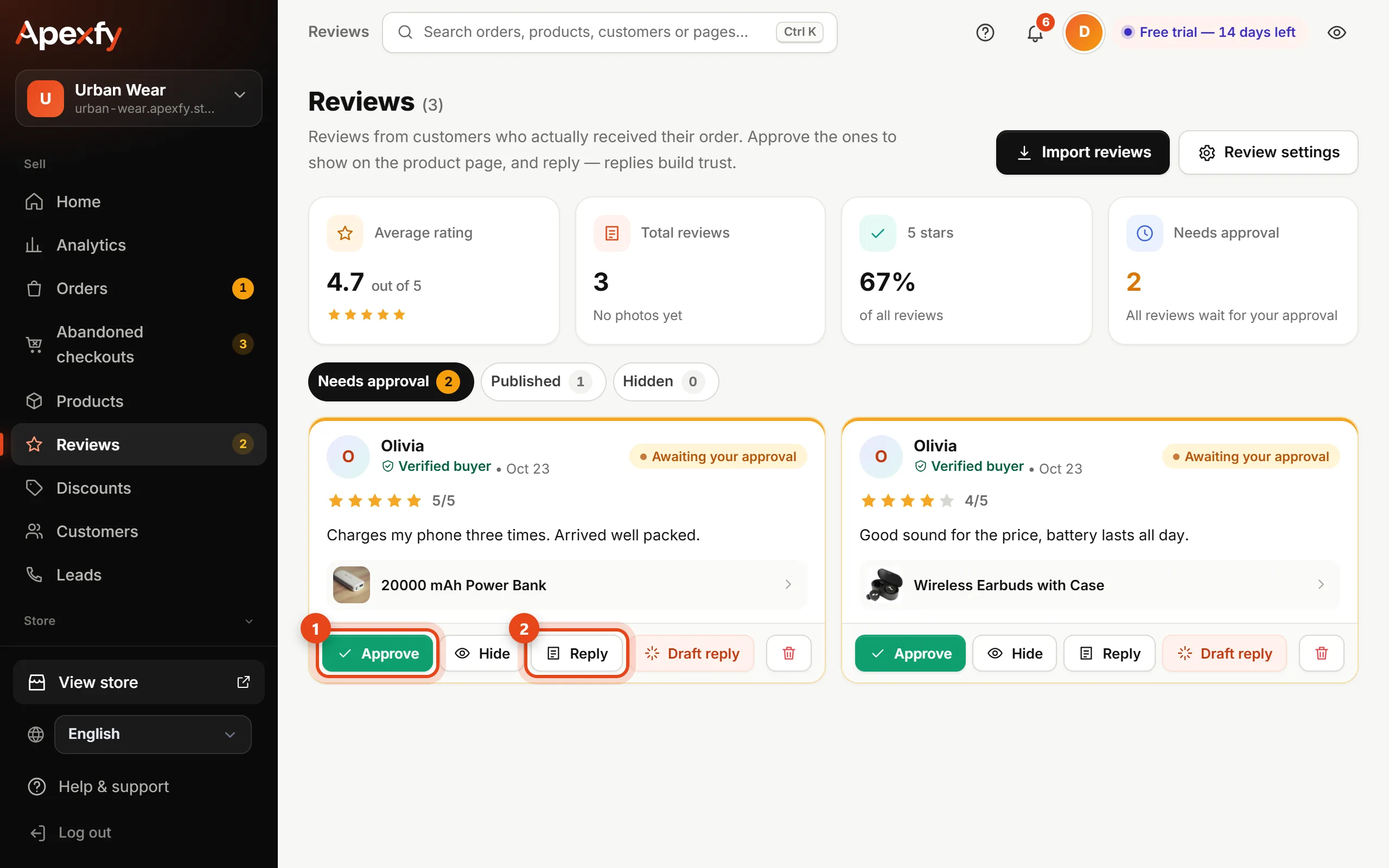
- New reviews are in Needs approval. Click Approve to show the review on the product page, or Hide to hide it.
- Click Reply to write a reply shown under the review, or Draft reply to have AI suggest one you can edit before saving.
- The top shows your average rating, number of reviews and share of 5-star reviews.
Settings and imports
- Review settings: auto-approve 4 and 5-star reviews; the rest wait for your approval.
- Import reviews: from a reviews file, or from the supplier's reviews for products you imported from them.
Replying to reviews — even the negative ones — builds trust with new customers.