
Digital products (files and license keys)
Sell ebooks, courses, software and templates. Customers pay with no shipping or address, and get their download link and license key automatically.
A digital product doesn't ship: the customer pays, then downloads their files or gets a license key for software or a subscription. You can sell digital and physical products in the same store.
Make a product digital
- Open the product from Products and, in the Digital product card, turn on Digital product (no shipping) (1).
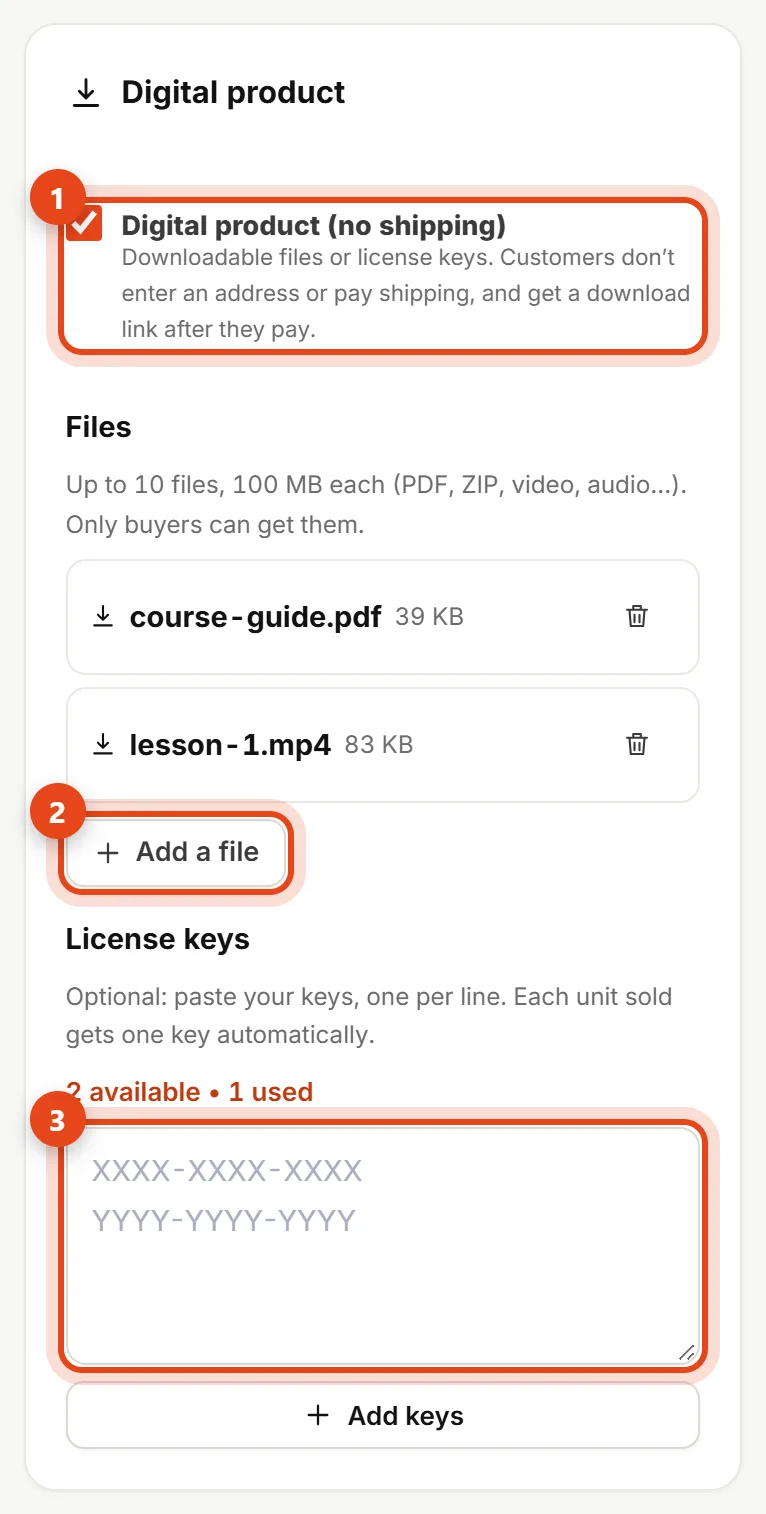
Digital product card on the product page - Click Add a file (2) and upload your files: up to 10 files, 100 MB each. Files are private, and only buyers can get them.
- Selling software or a subscription? Paste your license keys (3), one per line, and click Add keys. Each unit sold gets one key, and you can see how many are left.
- Click Save product.
Create and save the product first, then add files and keys. Digital products don't need inventory tracking, so we turn it off when you switch digital on.
What happens when someone buys
- If the cart only has digital products, the store doesn't ask for an address or charge shipping, just the country, state and email.
- Once they pay online, or when you mark the order Delivered, they get a Your downloads are ready email with a download button and their license keys.
- The download link works for 30 days and opens a page with all the files and keys from their order.

Downloads page for the customer
On the order page
You'll find a Digital products card (1): whether it's been delivered, the keys the customer got, the download count and the download link.

- Deliver now: delivers right away even if the order isn't paid yet (like when the customer paid you in cash).
- Send downloads again (2): resends the email if the customer can't find it.
- Send on WhatsApp: sends the customer the download link in a ready message.
If you run out of license keys, the order is delivered with the keys available and you'll see how many are missing. Add keys to the product, then send them to the customer.
See also Payment link for an order and Payment methods.